ELECTRONIC BAGPIPES AND OTHER MIDI INSTRUMENTS
- Universal Piper is compatible with every MIDI instruments : keyboards, EWI, electronic chanters and electronic bagpipes,...
- Universal Piper is provided with pre-configuration for most of the existing electronic bagpipes, with some of their fingerings.
- If you don't find yours, just let me know to add it.
| Instrument | UP preconfigured fingering | Format | Vib | Gliss | PLUG | Sensor |
|---|---|---|---|---|---|---|
| A-Pipes www.a-pipes.com |
|
GHB chanter | ? | ? | USB BT |
optical |
| Blair Digital Chanter blairbagpipes.com configuration file and instructions |
|
GHB practice | ? | - | USB | contact |
| Degerpipes www.deger.com |
|
GHB practice | ? | - | DIN | contact |
| Degerpipes II+ www.deger.com |
|
GHB practice | ? | - | DIN | contact |
| E-Pipe 15 www.folkworld.eu/39/e/epipe.html |
|
Gaita chanter | ? | ? | DIN | contact |
| Hevia hvebp.wordpress.com |
|
Gaita bagpipes | X | X | USB BT |
optical |
| K-pipes www.keltelec.com Coming soon |
|
GHB pratice GHB chanter |
X | - | DIN | contact |
| Master Gaita mastergaita.com |
|
Gaita chanter Gaita bagpipes |
X | - | DIN | contact |
| p2chanter www.p2chanter.com |
|
GHB pratice GHB chanter |
? | - | USB | contact |
| Redpipes www.redpipes.eu |
|
bagpipes in different design | X | ? | DIN | contact |
| Ross MidiPipes www.rosspipes.com |
|
GHB practice | ? | - | DIN | contact |
| Technochanter G2 www.fagerstrom.com configuration file and instructions |
|
specific | - | - | DIN | contact |
| Technopipes www.fagerstrom.com |
|
specific | - | - | DIN | contact |
| Trino trino.pt |
|
specific gaita chanter gaita bagpipes |
X | X | USB BT |
contact |
| WARBL warbl.xyz configuration file and instructions |
|
specific GHB chanter |
X | X | USB BT |
optical |
| OpenPipes DIY |
|
specific | ? | ? | USB | contact |
How to connect your MIDI practice or bagpipe
You will need a MIDI connection between your MIDI instrument and your computer or Apple Device. A MIDI connection is different from an audio one. There are different solutions to perform this connection. The proposed connection hereafter is the cheapest and allows you to connect both to a computer or an apple device. The links to hardware are provided as information only.
For technopipes, you will need to make the connection then switch to MIDI mode.
- 1 - The jack to MIDI cable provided with your MIDI instrument
- 2 - A female-female MIDI connector
- 3 - A MIDI to USB adaptor with LEDs (lights) displaying the MIDI traffic. Connect to the MIDI plug named IN or INPUT
- 4 - A Apple Camera Kit (female USB to Apple plug) if you want to plug to an Apple Device. Note: choose between Lightning and USB-C model depending on your iPad
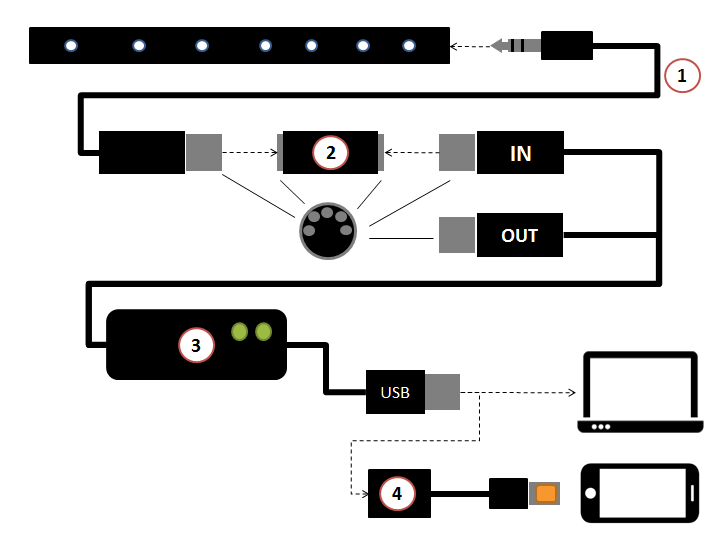
If your MIDI practice or bagpipe has a female MIDI plug you don't need 1 and 2.
There are also MIDI to USB adaptors (3) with female plugs, usually with several MIDI inputs, you won't need 2.
There are also MIDI to USB adaptors (3) with female plugs, usually with several MIDI inputs, you won't need 2.